

S6 Powered Subwoofer (Copy)
Pro Tip: Place the S6 on your desk or a nearby bookshelf at ear level. Its front-firing design minimizes disruptions to neighbors and fits well in compact spaces. If you crave more powerful bass for a larger room, consider the S8.
Technical Specifications
General Specifications
Type
Portable Bluetooth speaker
Amplifier Type
Class D
Power Output
20 W RMS total (10 W RMS per channel), AES
Drivers
2” woofers
3″ x 1.75″ passive radiator
Inputs
3.5 mm stereo mini-jack, Bluetooth
Outputs
N/A
Input Voltages
5.2 V DC, USB power
SNR
>95 dB (typical A-weighted)
THD+N
<0.5% at 50% charge
Crosstalk
N/A
Frequency Response
60 Hz-20 kHz ±1.5 dB
Frequency Response w/ Bass Reduction Switch selected
N/A
Analog Input Impedence
10K ohms unbalanced
Nominal Impedence
N/A
Input Impedence
N/A
Crossover Frequency
N/A
Protection
Output current limiting, thermal over-temperature, power on/off transient protection
Power Consumption
Idle: 10W
Standby Consumption
N/A
Phase
N/A
Recommended Amplifier Power
N/A
Battery Life
Up to 12 hours
Battery Charge Time
5 hours to 100%
Bluetooth Specifications
Internal D/A Converter
N/A
Internal BT Receiver
N/A
Input Bit Depth
16 bit
Bluetooth Receiver Type
N/A
Supported Codecs
SBC
Supported Bluetooth Profiles
A2DP, AVRCP
Wireless Operation Range
Up to 100 ft (30 m) typical outdoors, 30 ft (10 m) typical/average indoors
Input Data Rate
Determined by Bluetooth
Wireless Latency
~30 milliseconds (ms)
Usb Specifications
Connector Type
N/A
USB Device Class
N/A
Input Bit Depth
N/A
Input Sample Rate
N/A
Headphone Amp Specifications
Headphone Amp Type
N/A
Full-scale Headphone Output Level
N/A
Output Impedence
N/A
Recommended Headphone Impedence Level
N/A
Optical Specifications
Internal D/A converter
N/A
Input Bit Depth
N/A
Sample Rate
N/A
Weights And Measures
Dimensions (HWD)
3” (7.6 cm) x 7.75” (19.7 cm) x 3” (7.6 cm)
Weight
1.5 lb (0.7 kg)
Total Shipping Weight
2.5 lb (1.1 kg)
Shipping Box Dimensions (LWH)
9.75” (24.8 cm) x 4.75” (12.1 cm) x 4.625” (11.8 cm)
Environmental Requirements
Operating temperature: 32 degrees F to 95 degrees F
Non-operating temperature: -4 degrees F to 113 degrees F
Relative humidity: 5% to 95% non-condensing
Materials And Construction
High impact polycarbonate cabinet with perforated metal grills
2″ (52 mm) woofers with advanced voice coils
3″ (72.2 mm) x 1.75″ (44.5 mm) passive radiator
Custom Components
Audioengine designs and manufactures all of our own critical components. In other words, these are not “box built” speakers with off-the-shelf parts but custom-designed to our specifications. What we do not fabricate directly in our factory we have made to our designs (parts such as transformers, magnets, and wiring harnesses, for example).
High-quality Bluetooth Audio
The Bluetooth built into the 512 portable wireless speaker features SBC coding which is a highly-efficient Bluetooth audio codec with impressive sound.
Extended-range wireless. Most Bluetooth implementations have very limited range, typically within just one room. But with careful signal management circuitry and antenna tuning, we offer a superior solution that has up to 3 times the range of standard Bluetooth for multi-room use, with no degradation in audio quality. Up to 100 ft (30 m) typical outdoors, 30 ft (10 m) typical/average indoors.
Quickstart Guide
512 Quick Setup
Power ON/OFF
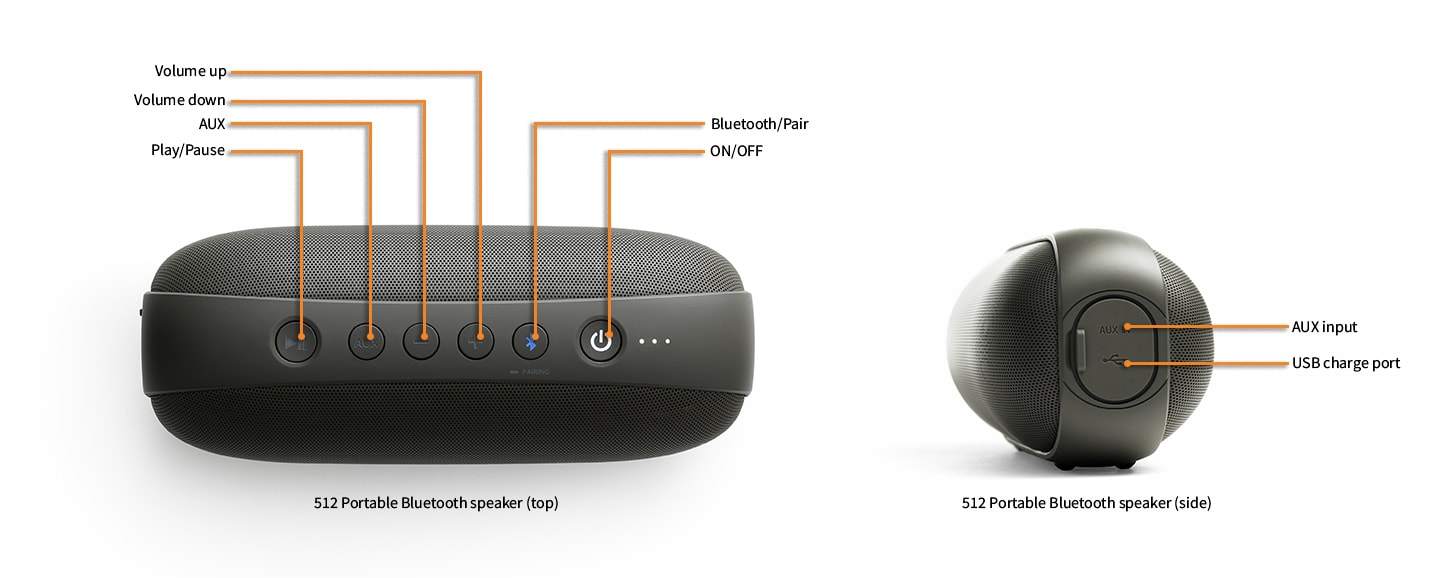
To turn on your 512, press and hold the power button on the top panel for about 3 seconds, then release the button.
The power button will light up and a sound will indicate that the speaker is on.
Wireless Connection
After charging the 512 battery, turn on the power.
Press and hold the Bluetooth button on the 512 top panel until a voice says “pairing”. The Bluetooth button will flash indicating the speakers are in pairing mode.
On your phone, tablet, or computer, go to Bluetooth settings and turn on Bluetooth.
Select the 512 from the Bluetooth device list to connect. Your 512 will say “connected”.
When your 512 is paired and connected, the indicator on the Bluetooth button will glow solid Blue.
To put the 512 back into pairing mode and disconnect from a device press and hold the Bluetooth button on th 512 top panel until the indicator begins flashing.
Aux Input
Usethe512 audio input to connect non-Bluetooth devices by connecting any 3.5mm mini-jack audio cable from your device’s audio output (headphone jack, etc.) to the “AUX” input jack on the side of the 512.
Press the AUX button on the 512 top panel if it is not already illuminated.
Volume
To Adjust the volume of the 512, use your device or press the volume up “+” and volume down “-” buttons on the top of the 512.
Play/Pause
To pause playback, or resume playback of a paused song, use your device or press the Play/Pause “►❙❙” button on the top of the 512.
Battery Charging
When the 512 needs charging, the power button will flash red and a low battery chime will play. Recharge the 512 via the micro USB port using the included cable and any 5V USB phone/tablet charger or the USB port on your computer. A full charge takes about 3 1/2 hours but you can continue to play music while the 512 is charging.
With a fully charged battery, you’ll get up to 12 hours of use at typical listening levels.
Troubleshooting
512 Troubleshooting Tips
The following troubleshooting tips can help diagnose and correct most concerns with the 512. We have attempted to make this list as comprehensive as possible, so some of these may not apply to your issue, but please go through each tip.
If the power button on the 512 is not illuminated, then try these tips:
- Make sure the 512 is charged. If not, you’ll need to connect the 512 to an external USB AC adapter with the supplied USB cable.
- Press and hold the power button on the top of the 512 until you hear the power-on notification
512 troubleshooting tips – Bluetooth
- If you haven’t already, power-cycle your speaker by turning it off and back on.
- Be sure to test your 512 using the Aux input instead of Bluetooth.
- If your 512 is already connected to a device via Bluetooth, the Bluetooth Pair light on the top of the speaker will be on and solid. To disconnect a device that is currently connected to the speaker, press and hold the Pairing button on the top until you hear the “pair mode” notification.
- Check to make sure your source device (computer, tablet, phone, etc) and all audio apps are running the most up-to-date version of software available. For Mac OS users, be sure to check the app store to see if there’s a newer version of Mac OS you could be running.
- Try playing audio from more than one application on your phone/tablet, or computer.
- Try disconnecting from and forgetting the 512 through your device’s Bluetooth settings and then re-pair to the 512.
- Try using a different device with your 512 to see if the issue follows.
- If possible, try your 512 in a different location to see if something is causing an issue in the current setup. Something as simple as a wireless internet router, cordless or mobile phone, or halogen lamp near the speakers may be causing interference in your setup.
If you are experiencing an audio-related issue using the Aux input, try these tips:
- Check to see if the Aux button on the top of the 512 is illuminated. If not, press the Aux button.
- Check that the cables from your audio sources to the speaker are properly connected. Confirm this by unplugging the audio cables and then reconnecting.
- Verify that the volume control on the top of the speaker is not turned all the way down.
- Make sure the volume is up on your media players, internet radio, master control, device volume, etc. and that the balance control is centered.
- Decrease the volume of the input audio source and increase the volume of the 512 speaker.
- Try using different audio input sources and/or devices to see if the problem follows.
- If your input source has its own EQ (equalizer), please make sure the low end is at a moderate level as having too much bass in your signal can cause distortion.
- Move your speaker to a different location to see if something is causing interference in the current setup. Something as simple as a wireless internet router, cordless or mobile phone, or halogen lamp near the speaker can cause interference.
FAQ's
What is Affirm?
Affirm is a financing alternative to credit cards and other credit-payment products. Affirm offers instant financing for online purchases to be paid in fixed monthly installments over 3, 6 or 12 months.
Why buy with Affirm?
- Buy and receive your purchase right away, and pay for it over several months. This payment option allows you to split the price of your purchase into fixed payment amounts that fit your monthly budget.
- If Affirm approves your loan, you’ll see your loan terms before you make your purchase. See exactly how much you owe each month, the number of payments you must make, and the total amount of interest you’ll pay over the course of the loan. There are no hidden fees.
- The application process is secure and real-time. Affirm asks you for a few pieces of information. After you provide this information, Affirm notifies you of the loan amount that you’re approved for, the interest rate, and the number of months that you have to pay off your loan — all within seconds.
- You don’t need a credit card to make a purchase. Affirm lends to the merchant directly on your behalf.
- You may be eligible for Affirm financing even if you don’t have an extensive credit history. Affirm bases its loan decision not only on your credit score, but also on several other data points about you.
- Affirm reminds you by email and SMS before your upcoming payment is due. Enable Autopay to schedule automatic monthly payments on your loan.
What is required to have an Affirm account?
To sign up for Affirm, you must:
- Be 18 years or older (19 years or older in Alabama or if you’re a ward of the state in Nebraska).
- Not be a resident of Iowa (IA) or West Virginia (WV).
- Provide a valid U.S. or APO/FPO/DPO home address.
- Provide a valid U.S. mobile or VoIP number and agree to receive SMS text messages. The phone account must be registered in your name.
- Provide your full name, email address, date of birth, and the last 4 digits of your social security number to help us verify your identity.
How does Affirm work?
Affirm loan-application process steps:
1. At checkout, choose Pay with Affirm.
2. Affirm prompts you to enter a few pieces of information: Name, email, mobile phone number, date of birth, and the last four digits of your social security number. This information must be consistent and your own.
3. To ensure that you’re the person making the purchase, Affirm sends a text message to your cell phone with a unique authorization code.
4. Enter the authorization code into the application form. Affirm instantly notifies you of your approved loan amount, the interest rate, and the number of months you have to pay off your loan. You have the option to pay off your loan over three, six, or twelve months. Affirm states the amount of your fixed, monthly payments and the total amount of interest you’ll pay over the course of the loan.
5. To accept Affirm’s financing offer, click Confirm Loan.
Need more info? Click here for additional Affirm support.
10/18/2019
We have received several reports from Apple customers who have had trouble staying connected to their Audioengine products via Bluetooth since the release of recent iOS and MacOS software updates. We are doing our part to provide Apple with reporting on these issues and working toward a timely resolution.
Apple has recently released their 13.3.1 update that addresses Bluetooth connectivity issues and we would encourage you to download it by going into your iPhone/iPad Settings> General> Software Update. After the update to 13.3.1, please go to Settings> Bluetooth> tap the encircled “i” to the right of the Audioengine product> tap Forget this device. Then unplug/power off your Audioengine product and plug it back in/power it back on, and pair to it again from your phone. Most customers have had success with these post-update steps, but some have had to repeat them a few times to achieve it. For those who have not, here are our troubleshooting tips that most other iOS users have confirmed resolved their Bluetooth connectivity issue:
(For our wireless speakers, please check to verify that the antenna is attached to the back of the powered speaker. If you’re unable to locate the antenna, double-check the plastic bag that contains the product manual and brochure.)
1) Try restarting your iPhone and iPad as well as the speakers to see if that fixes the issue.
2) Check to make sure your Apple device is running the most up to date version of software available.
3) Try disconnecting from and forgetting the Audioengine device through your iPhone/iPad’s Bluetooth settings, and re-pairing.
4) Try playing audio from more than one application on your iPhone, iPad, or Mac.
5) Try using a different source device (not your iPhone or iPad) with your Audioengine product to see if the issue follows. Be sure to test your Audioengine product using the analog input as well.
6) If none of the previous steps have worked for you, try resetting the network settings. This will wipe all networks from your iPhone/iPad (Bluetooth, Wi-Fi, and Cellular) so you will want to make sure you know or have stored the Wi-Fi passwords you need. You will likely need to set up all Bluetooth connections again as well. To reset the network settings, go to Settings > General > Reset > Reset Network Settings.
For MacOS users:
The first thing we’d recommend trying is a NVRAM/PRAM reset. This resets the system configurations for some audio and video related functions and can help clear up problems related to audio. After this reset, you may have to go into your Bluetooth settings and “forget” your Audioengine product, power your Audioengine product off and on, restart your Mac, and pair with the Audioengine product again. Here are the steps for how to do the NVRAM/PRAM reset:
1) While holding the Shift + Option (Alt) keys on your Mac’s keyboard, click the Bluetooth symbol in the top-right corner of the macOS menu bar. (If you don’t see it there, you need to check Show Bluetooth in menu bar in System Preferences -> Bluetooth.)
2) Locate the revealed Debug submenu and hover your mouse cursor over it.
3) Click “Reset the Bluetooth module”.
4) Now, restart your Mac.
*We also recommend checking the App store to see if there is a newer version of Mac OS you could be running.
To our Audioengine community,
We remain committed to offering you a better way to listen and are working hard to make sure your experience is great from beginning to end. Here are a few updates regarding our day to day operations.
- We continue to ship orders daily. Orders placed through our website will be shipped the following business day.
- We are working to replenish our inventory on out-of-stock items as quickly as possible and will update as shipments are received.
- Back in stock with limited quantities: HD3 Wireless Speakers in ALL colors, A2+ Wireless Speakers in Black and our S8 Subwoofer in Black. Hurry before they’re gone!
- Our customer support team is still available to assist you Monday-Friday, 9am-5pm. Please reach out to us with any issue via our support form found here.
We thank you for your patience and encourage you to keep living out loud!
The Audioengine Team